
Digital Pathology Basics: Image Viewers vs. Image Management Systems
Wednesday January 7, 2026

In brief
- An image viewer focuses on the basics of viewing and interacting with digital slides.
- A digital pathology IMS manages the entire lifecycle of digital pathology images within a clinical, research, or educational workflow.
As digital pathology becomes more integrated into clinical, academic, and research settings, it’s important to distinguish between the tools used in this domain. Two common types of software encountered are pathology slide viewers and digital pathology image management systems (IMS). While they may appear similar on the surface (both enable users to access and interact with digital slides) they are fundamentally different in terms of scope, features, and intended use.
Pathology Slide Viewer: A Focused Viewing Tool
A pathology slide viewer is a software application designed primarily for visualizing digitized pathology slides, also known as whole slide images (WSIs). These tools typically allow users to open and navigate high-resolution scans of tissue specimens. Common features include zooming, panning, rotation, and the ability to add simple annotations or measurements.
These viewers can be used by pathologists for reviewing cases, by students for learning, or by researchers for image analysis. They may be standalone desktop applications or web-based platforms. Some viewers are vendor-specific, tied to a particular scanner or image format, while others are open source or multi-format compatible. However, pathology slide viewers are limited in scope. Their main purpose is to enable manual, visual inspection of slides. They typically do not provide broader workflow functionality, user management, or system integrations. For small-scale or individual use, slide viewers are handy tools. But their limitations will quickly become apparent.
Digital Pathology Image Management System (IMS): A Comprehensive Platform
In contrast, a digital pathology image management system (IMS) such as PathPresenter is a comprehensive, enterprise-grade software solution that manages the entire lifecycle of digital pathology data. It includes not only the viewing of whole slide images, but also the organization, tracking, analysis, and sharing of those images in clinical and research workflows. An enterprise deployment of an integrated digital pathology workflow will almost certainly require a fully featured IMS.
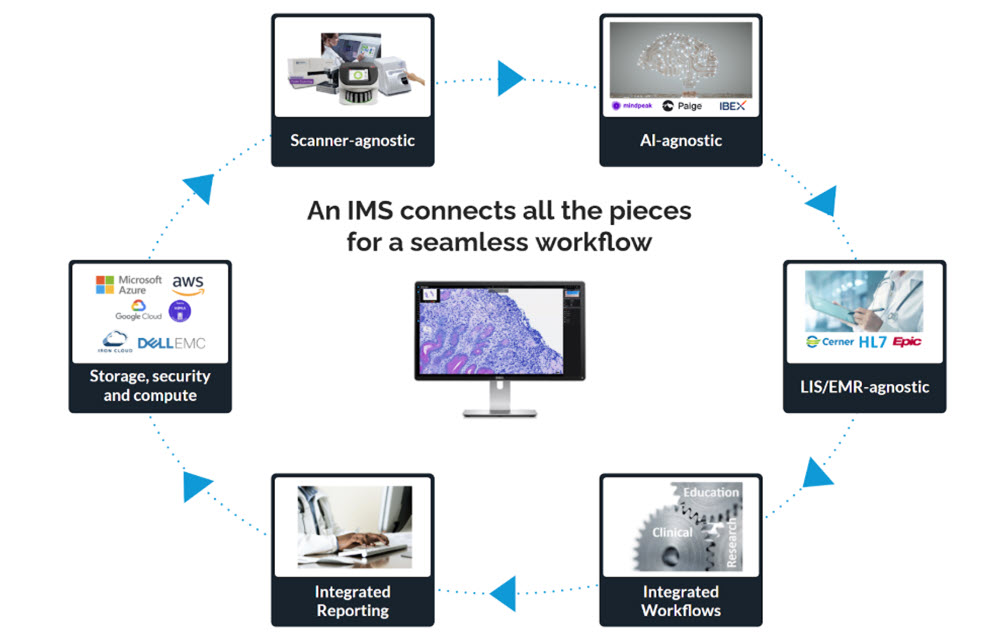
A robust IMS typically includes the following core capabilities:
- Slide Viewing: IMS platforms provide high-quality visualization with features like synchronized multi-slide viewing, annotation, overlays, and fast rendering across many file formats (svs, ndpi, scn, dcm, bigtiff, etc.).
- Data Management: IMS centralizes and secures pathology data with on-premise, cloud, or hybrid storage options.
- Security: IMS must meet strict standards (e.g., HIPAA), ensuring PHI confidentiality, integrity, and availability while protecting against threats.
- Workflow Integration: Platforms support case management, task tracking, and diagnostic, research, or education workflows, often with integrated security like SSO.
- User Roles & Access Control: Permission-based access and audit trails ensure only authorized users can view sensitive data while maintaining accountability.
- Interoperability: IMS integrates with LIS, PACS, EHR, and other systems. PathPresenter is vendor-agnostic, with integrations to leading systems such as EPIC Beaker and LigoLab.
- Collaboration Tools: Multi-user environments enable real-time sharing, remote consults (e.g., PathPresenter’s ConsultConnect), and team-based diagnosis or education.
- AI and Image Analysis: Advanced IMS platforms integrate AI for detection, quantification, and pattern recognition. PathPresenter partners with leading vendors including Paige, Aisencia, Aiforia, MindPeak, Pictor Labs, Primaa, DeepLIIF, DiaDeep, Artera and IBEX to embed models within its workflow. PathPresenter powers the College of American Pathologists’ (CAP) AI Studio, which lets member test drive AI models from multiple vendors in one site with a common UI.
- Regulatory Compliance: IMS solutions are generally designed to meet HIPAA, FDA, GDPR, and or IVDR standards depending on the application and jurisdiction. PathPresenter’s clinical viewer is FDA 510(k) cleared and EU-IVDR certified for primary diagnosis with approved scanners.
Key Differences and Use Cases
While both a slide viewer and an IMS allow for digital slide visualization, their purposes differ greatly. A slide viewer is ideal for simple, low-volume, or individual use cases, such as academic review, research projects without extensive collaboration, or basic diagnostic reference. It is generally easy to deploy and use, and may come free of charge or at a low cost.
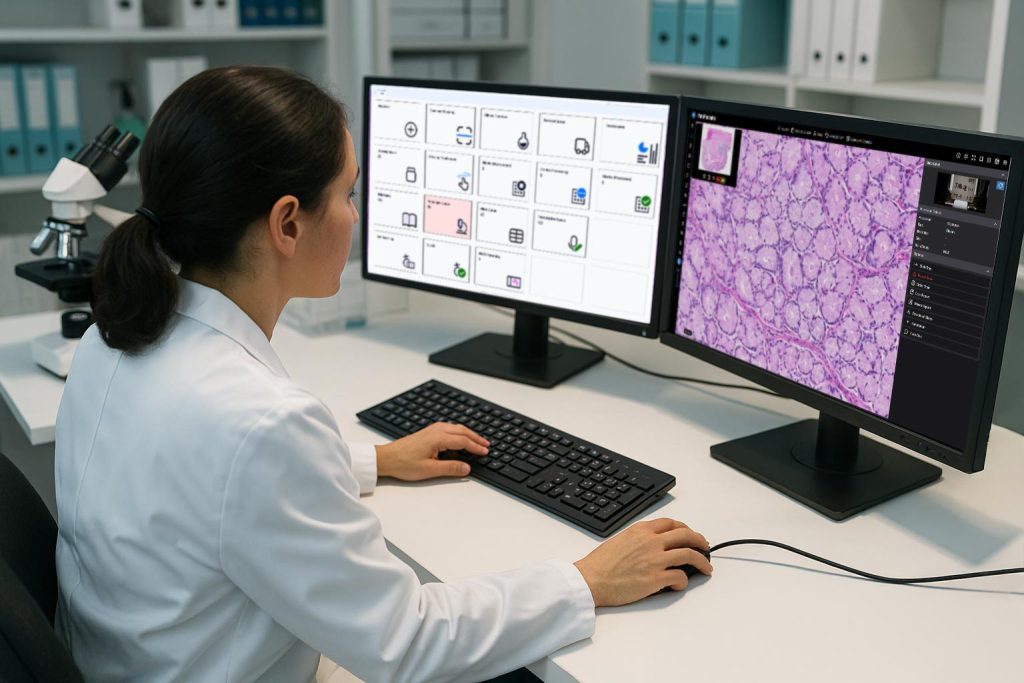
A digital pathology IMS, on the other hand, is suitable for high-volume, regulated environments such as hospitals, diagnostic labs, and collaborative research institutions. These systems are designed to scale with demand, handle multi-user scenarios, and provide robust governance and compliance. They also support complex workflows involving multiple roles, locations, and datasets.
Choosing between a viewer and an IMS depends on the specific requirements of the organization or individual, whether it’s ease of access and simplicity, or full integration, scalability, and workflow optimization.
More Information
Not sure if a viewer or IMS is right for you? Connect with our team to assess your workflow needs and explore the best solution.
More Posts
- Dr. Rajendra Singh named to The Pathologist’s Power List Hall of Fame
- PathVisions2026 Workshop: How Leading Centers Are Building Connected Pathology Workflows with PathPresenter
- PathPresenter co-Founder Dr. Rajendra Singh named to The Pathologist’s Power List 2026
- Primaa and PathPresenter Introduce Fully-Integrated AI Workflows for Dermatopathology
- The Proof Problem, Part 1: AI Isn’t Replacing Our Job. It’s Adding a New One.